- DATE:
- AUTHOR:
- BT EPSA Team
BT Enterprise PSA 1H 2026 Release Live
This release introduces a range of usability, performance, and integration updates. These improvements are designed to reduce manual effort, streamline project workflows, and strengthen system security and interoperability across Enterprise PSA.
What's New -
NEW: Role Scheduler Editor - Inline Updating & Expanded Timeline
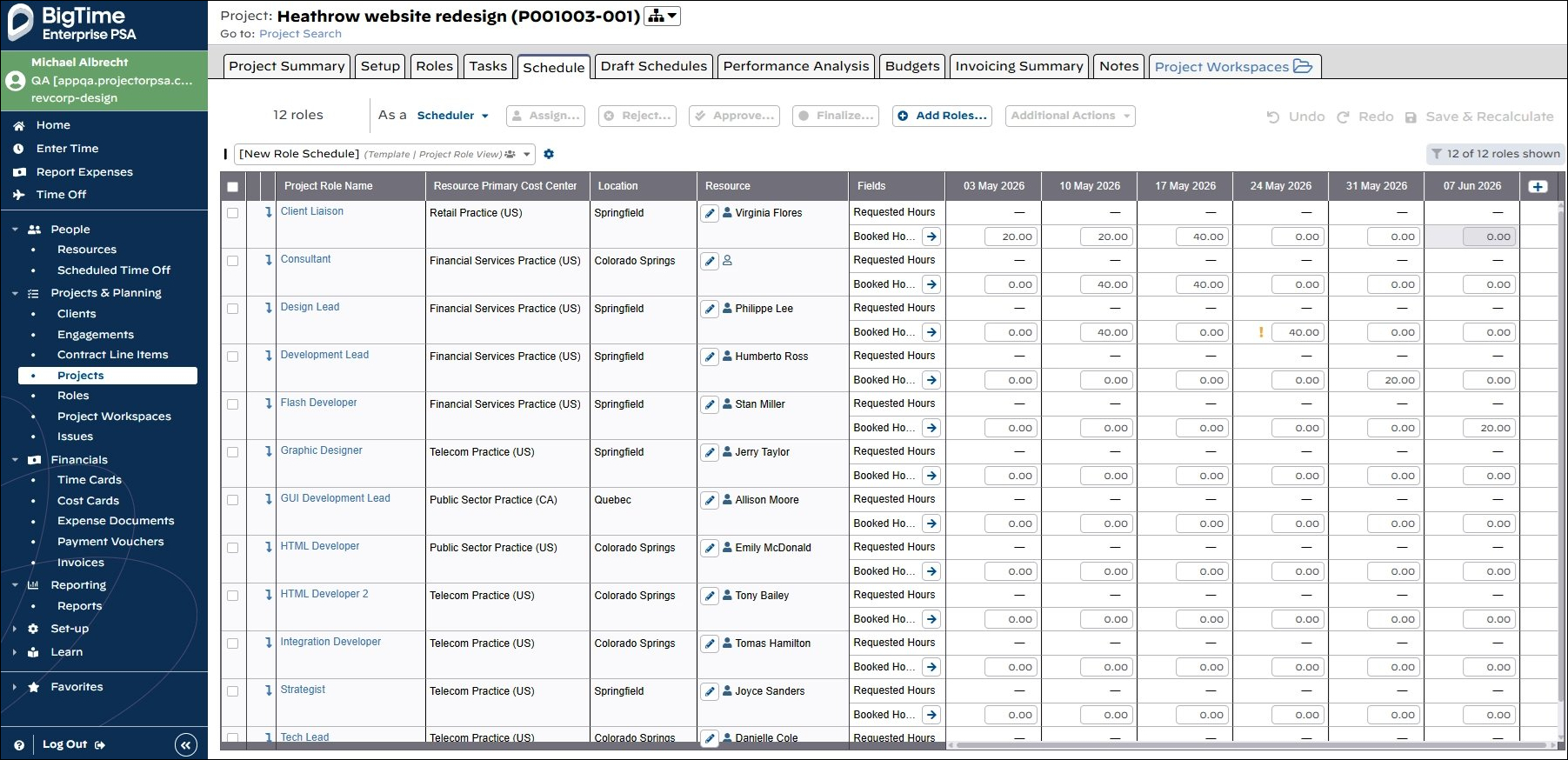
Goal: assign and update schedules in fewer clicks, with more space to view the project timeline
With this update, you can now manage resource assignments directly inline on the scheduling screen. No more modal windows, with the added benefit of being able to view more of the project timeline.
IMPROVED: Draft Schedule - Draft Roles Unique From Schedule
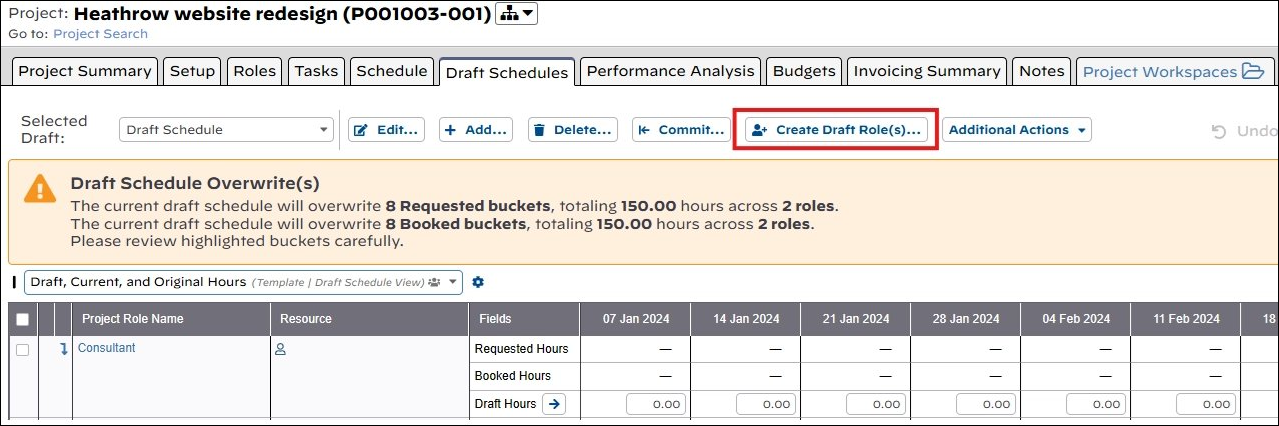
Goal: flexibility to play out different what if scenarios
You can now add draft roles to your draft schedules that are not present on the project’s schedule, so that there is more flexibility to explore different draft scheduling scenarios to meet your desired project margins.
NEW: BT Services CPQ Integration
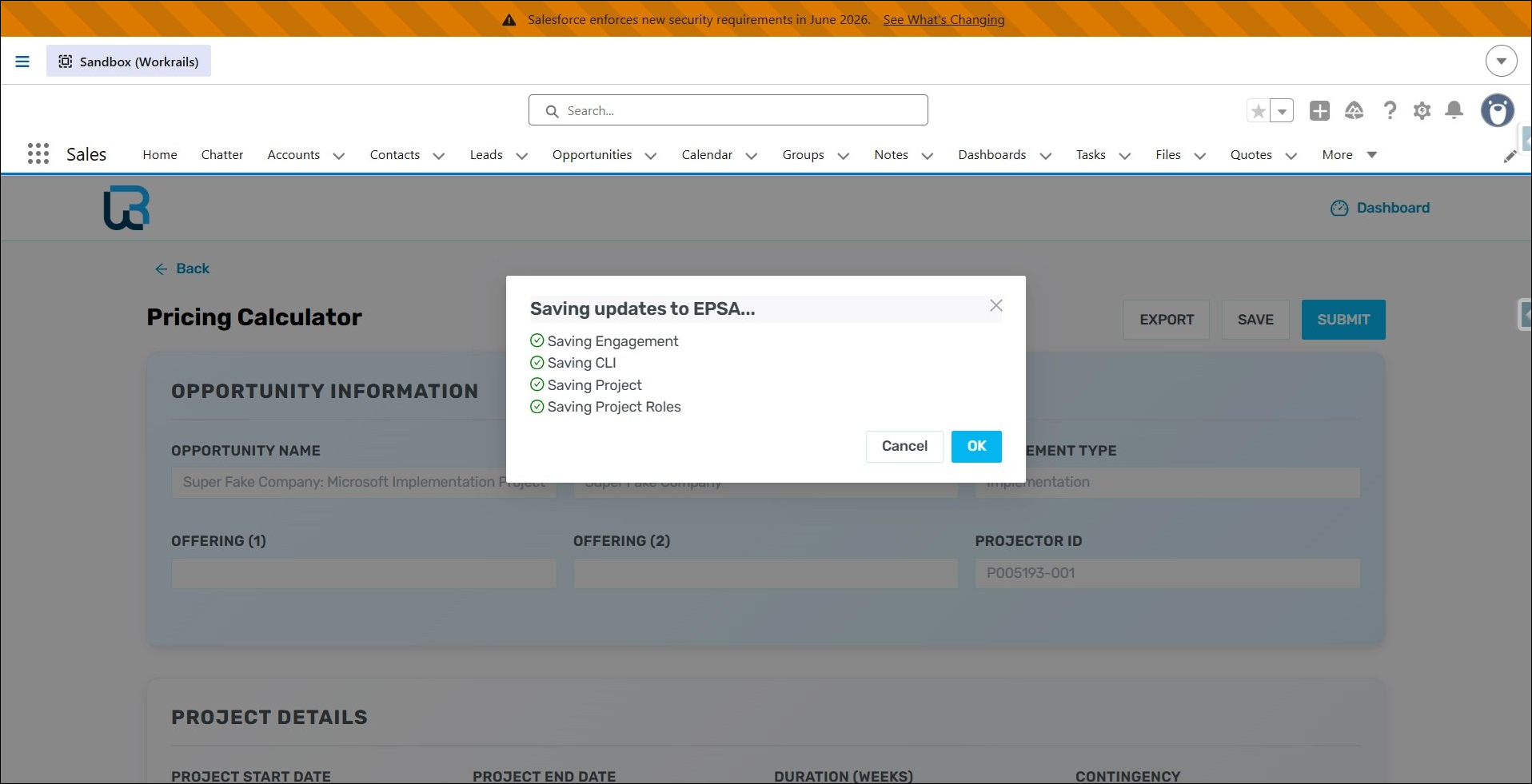
Goal: seamless opportunity handoff between sales and execution
EPSA now integrates with BT Services CPQ, so that RDC rates in EPSA will populate in SCPQ as your sales team builds quotes to ensure accurate pricing to meet desired margins. As the quote is built out and reaches the configurable threshold for the probability to close, the EPSA project will automatically create and populate with the resource schedule from the quote. This reduces the manual handoff and data entry between sales and resource management teams, so that the resource managers in EPSA can forecast if there are enough resources for the demand and execute the work per the agreement.
IMPROVED: Smartsheet - Assign Different Role Allocation Percentages
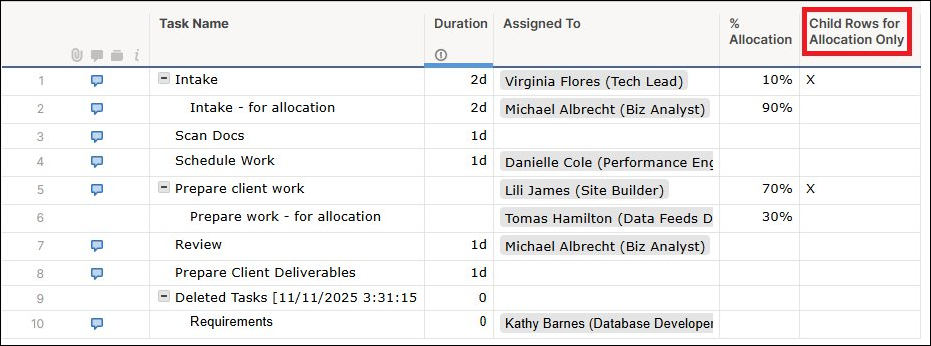
Goal: flexibility to assign roles on the same task at different allocation percentages
The EPSA integration with Smartsheet will now overcome the limitation in Smartsheet, where all roles assigned to a task have to have the same allocation percentage. With this enhancement, tasks can be marked so that all child Smartsheet rows are for allocation purposes only. Child rows can now be assigned different roles with different allocation percentages. These child rows are not added as tasks in EPSA. The roles, with their allocation percentages, are added to the EPSA task associated with the parent Smartsheet task.
IMPROVED: Smartsheet - Sync Issue Indicators
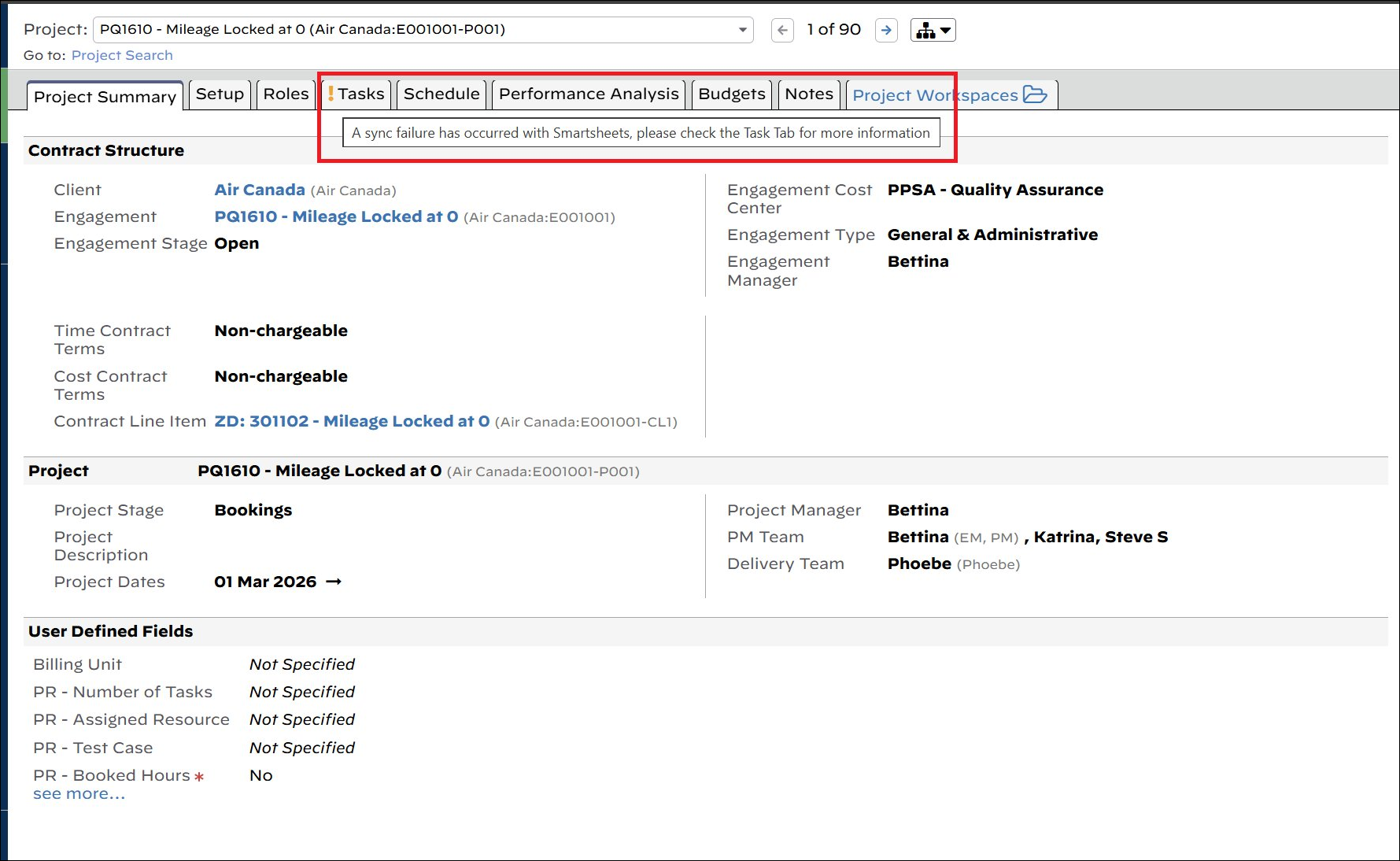
Goal: more visibility to resolve sync issues
EPSA now has additional visibility to any sync issues between Smartsheet and EPSA. Any projects failing to sync with Smartsheet are now listed on the Tasks tab on the project landing page to bring attention in order to resolve any issues.
NEW: Macro-less Reporting - Email Distribution
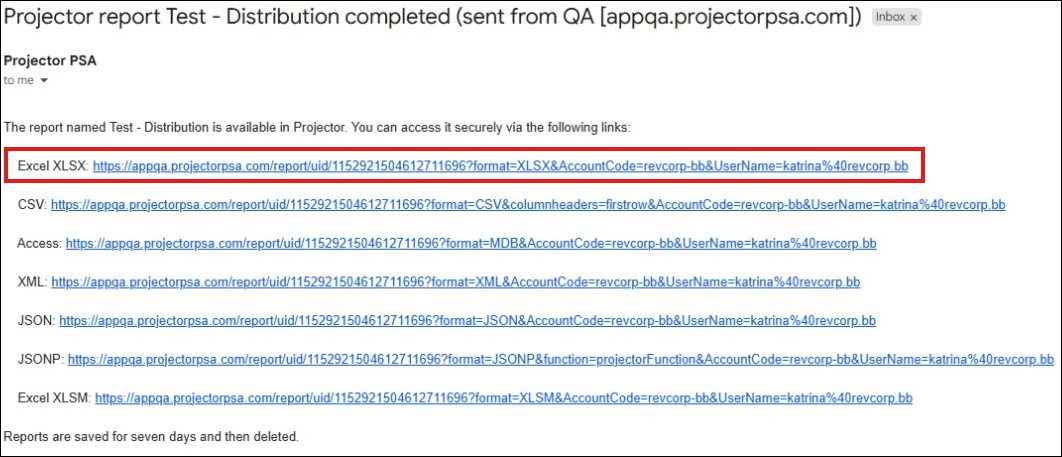
Goal: distribute reports without macros to avoid security warnings
You can now distribute scheduled reports that do not contain macros. With these new reports, users will no longer receive warning messages in Excel when viewing reports.
Additional Updates
Scheduled Variance Report
Added the project's “Total Budgeted Chargeable Hours” field to the report
Invoice UDFs added to the following report types:
Ginsu
Time Card
Invoice Milestone
Cost Card
Cost Card History
Engagement
Time Card History
Accounting Analysis
Client Report
Added "Last Billed Date" field to the Client Report
BT Projector Updated to Enterprise PSA
Login page and left navigation logo
Billing Info Enhancements in Installation Metering Data
Added column header explanations
Added a column to denote what users/resources count towards a license for a month
Added a filter to Billing Info, so can filter by users that count toward the active count
PQ-1616
Fixed a bug where reports were continuously added to the report queue when no account period was scheduled next
PQ-1609
Fixed an issue where Total Utilization % on the Resources page was displaying incorrect values inconsistent with the Utilization Report
PQ-1607
Fixed an issue where the OpsUpdateResourceTimeoff web service returned a "DuplicateScheduledTimeOff" error when multiple requests were sent for different resources sharing the same time off date
PQ-1606
Fixed an issue in Draft Scheduling where undoing a change caused the Redo button to become disabled
PQ-1605
Fixed an error occurring when accessing a project landing page via Client / Engagement / Project Search
PQ-1599
Fixed a PwsDeleteProject error occurring when deleting a project with role UDFs that resulted in a NULL value constraint violation
PQ-1597
Fixed an error occurring when deleting a Public View on the Project Landing Page Schedule
PQ-1585
Extended the fix for the Smartsheet webhook creation failure bug to also apply to project links
PQ-1584
Fixed a synchronization issue occurring when creating webhooks during a Smartsheet installation copy
PQ-1580
Fixed an issue in Audit Trail Reports where a Role Entity Type UDF update failed to include Role and/or UDF identifiers
PQ-1565
Fixed an issue in Draft Schedules where Fill Special did not properly fill cells that were added as a result of the Fill Special operation itself
PQ-1564
Fixed an issue where dates were improperly adjusted during deserialization for e-invoicing, affecting XRechnung e-invoices
PQ-1558
Added a lightweight service to retrieve Project sub-entity summary lists
PQ-1552
Fixed an issue on the Project Landing Page where the role count of displayed roles in Draft Schedules was missing
PQ-1548
Fixed an issue on the Resource Landing Page Schedule where modifying a single role incorrectly tagged all roles as "recently modified"
RW-286
Disabled inapplicable Fill From options (Task Hours, Remaining Task Hours, Requested Hours, and Booked Hours) for Draft Roles in Draft Schedules
RW-2
Fixed a UI display issue where the word "contractlineitem" was not formatted as "contract line item" in locked record messages
RW-215
Fixed an issue in the Task Analysis Report where Actual Start and End Date fields were not returned when a role or resource was included in the report
If you have any questions about our May 16th, 2026 release or need more information, reach out to BigTime Enterprise PSA anytime at support@projectorpsa.com.